Empty Clean — Empty Object Cleaner for 3ds Max
Empty Clean is a lightweight utility for 3ds Max 2024+ (think it works with older as wel) that helps you quickly find and remove useless objects from your scene — without breaking production setups.
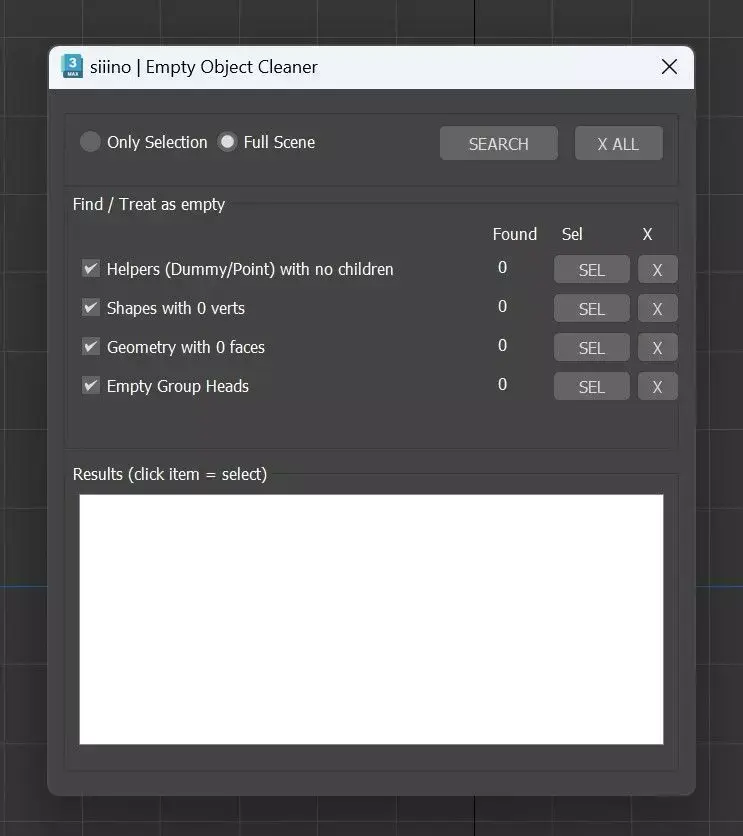
The tool scans the scene (or current selection) and detects:Empty Helpers (Dummy / Point with no children)Empty Shapes (0 vertices / knots)Empty Geometry (0 faces)Empty Group Heads
Key featuresOne-click SEARCH: scans the scene and immediately shows all results in a listInteractive results list: click an item - it gets selected in the viewportCategory SEL buttons: select objects by type and filter the list instantlySafe X / X ALL deletion with Undo supportGroups are opened recursively and kept open during the search
Built-in hard ignores:Cameras and Lights
All Camera/Light TargetsHidden objectsChaos Scatter / Forest Pack objects (fully excluded)Workflow-friendlyDoes not collapse, convert, or modify valid geometryWorks on Full Scene or Only SelectionClean, compact UI designed for daily production useInstalled as a macro button:Customize UI - Category: siiino - Button: Empty Clean
Purpose:Keep scenes clean, lightweight, and readable — especially in large architectural or imported scenes — without touching anything that matters.
MS (3ds Max macroScript, filesize: 23.4 KB)