
Publication date: 2022-02-05
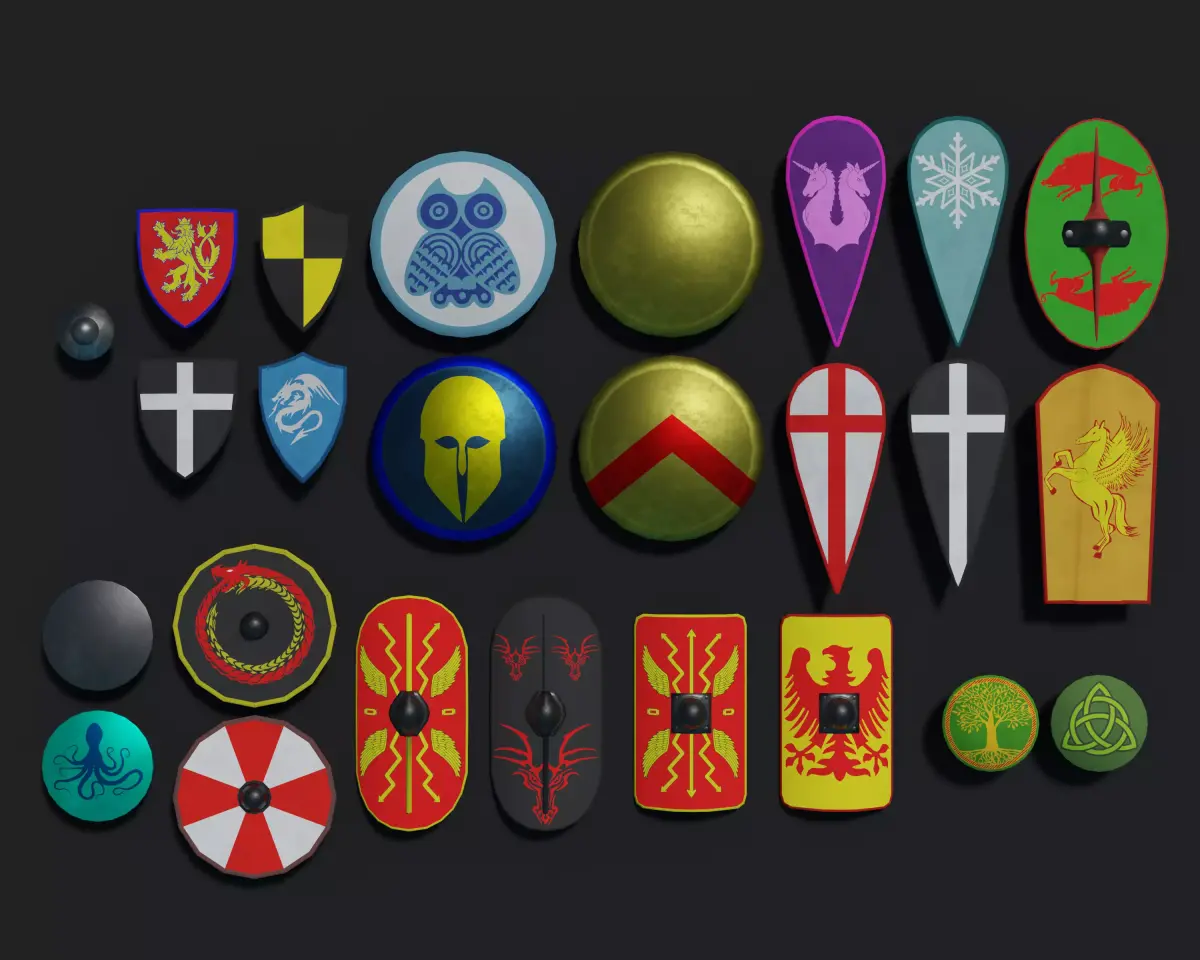
Buy Ancient and Medieval Shields 3D Model Pack
$10
License: Royalty Free
Rigged
PBR
Realtime
Animated
Free

author:
tyorex
Renders and source materials belong to the author tyorex.
Specifications
- Platform
- cgtrader
- Animated
- Rigged
- 3D Print ready
- VR / AR / Low-poly
- PBR
- Textures
- Materials
- UV Mapping
- Polygons
- 0
- Vertices
- 0
- Geometry
- Unknown
Usage recommendations
Realtime rendering
✕
PC Game development
✕
Mobile Game Development
✕
VR/AR applications
✕
Visualisation
✓
Cinema
✓
Advertising
✓
3D Printing
✕
CAD Engineering
✕
E-Commerce & Interactive 3D Web
✕
FAQ
Is this a free 3D model?
No, this model costs $10.
How do I download this 3D model?
Click the "Go to purchase" button to buy and download this model.
What license applies to this model?
This model is distributed under the Royalty Free license. Click "Go to purchase" for full license details.
Does it include rigging and animation?
This model has no rig or animation. It is a static 3D object.
Does this model have UV mapping?
No, this model does not have UV mapping.
What textures and materials does this 3D model include?
This model has no textures or materials.
Can I use it for 3D printing?
No, this model is not intended for 3D printing.
Additional information
A collection of low poly ancient/medieval shield models.
Each model comes with a set of PBR textures in 2K resolution.
Textures include:
Diffuse colour (some models have multiple diffuse colour textures with different designs)
Blank diffuse colour (Intended to be used as a template for creating additional versions of diffuse textures with different designs. To do so, open the image in any image editing software, such as GIMP, Photoshop, etc., create a new layer on top of the diffuse texture layer with its mode set to multiply, then paint your new design on the new layer over the white shield face area. This allows you to change the colour while retaining details. Export your new image and use it as your diffuse texture.)
Metallic (white = metal, black = non-metal)
Smoothness (Grayscale. White = smooth, black = rough)
Normal (A normal map)
Metallic Smoothness (a combined version of the metallic and smoothness textures compatible with Unity Engine's default shader. Metallic info is stored as colour, smoothness is stored in the alpha channel)
Feel free to contact me with any questions or concerns or for additional formats: tyorexgames@gmail.com
Each model comes with a set of PBR textures in 2K resolution.
Textures include:
Diffuse colour (some models have multiple diffuse colour textures with different designs)
Blank diffuse colour (Intended to be used as a template for creating additional versions of diffuse textures with different designs. To do so, open the image in any image editing software, such as GIMP, Photoshop, etc., create a new layer on top of the diffuse texture layer with its mode set to multiply, then paint your new design on the new layer over the white shield face area. This allows you to change the colour while retaining details. Export your new image and use it as your diffuse texture.)
Metallic (white = metal, black = non-metal)
Smoothness (Grayscale. White = smooth, black = rough)
Normal (A normal map)
Metallic Smoothness (a combined version of the metallic and smoothness textures compatible with Unity Engine's default shader. Metallic info is stored as colour, smoothness is stored in the alpha channel)
Feel free to contact me with any questions or concerns or for additional formats: tyorexgames@gmail.com
Similar models
Find the models you need