
Publication date: 2023-11-09
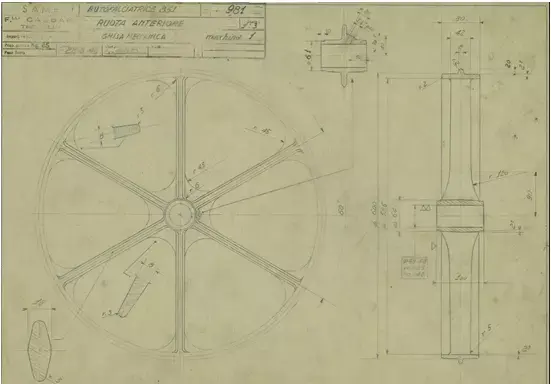
Download Create wheel in SolidWorks matching design CAD Free 3D model
free
License: Royalty Free No Ai
Rigged
PBR
Realtime
Animated
Free

author:
robbie89smith
Renders and source materials belong to the author robbie89smith.
Specifications
- Platform
- cgtrader
- Animated
- Rigged
- 3D Print ready
- VR / AR / Low-poly
- PBR
- Textures
- Materials
- UV Mapping
- Polygons
- 0
- Vertices
- 0
- Geometry
- Unknown
Usage recommendations
Realtime rendering
✕
PC Game development
✕
Mobile Game Development
✕
VR/AR applications
✕
Visualisation
✓
Cinema
✓
Advertising
✓
3D Printing
✕
CAD Engineering
✕
E-Commerce & Interactive 3D Web
✕
FAQ
Is this a free 3D model?
Yes, this model is available for free.
How do I download this 3D model?
Use the "Go to download" button below to get this model.
What license applies to this model?
The Royalty Free No Ai license applies to this model. More details are available via the "Go to download" button.
Does it include rigging and animation?
This model has no rig or animation. It is a static 3D object.
Does this model have UV mapping?
No, this model does not have UV mapping.
What textures and materials does this 3D model include?
This model has textures, but no separate materials are defined. The exact technical parameters are listed in the Specifications block.
Can I use it for 3D printing?
No, this model is not intended for 3D printing.
Additional information
Creating a wheel design in SolidWorks involves several steps to craft a detailed and accurate CAD model. To begin, the process usually starts by sketching the wheel's profile and dimensions using the software's sketch tools. These initial sketches define the basic shape and proportions of the wheel.
Next, utilizing features like extrusions, revolves, and lofts, the 2D sketches are transformed into 3D geometry, giving depth and structure to the wheel. This phase involves adding details such as spokes, rims, and any specific patterns or textures that the wheel may have.
In SolidWorks, applying constraints and dimensions is crucial to ensure the model is precise and adheres to the intended measurements. This step involves defining parameters such as diameter, width, and any other relevant specifications.
The software allows for further refinements and adjustments, permitting the designer to fine-tune the model until it accurately matches the intended design. SolidWorks also offers tools for rendering and visualizing the wheel, giving a realistic representation of the final product.
Next, utilizing features like extrusions, revolves, and lofts, the 2D sketches are transformed into 3D geometry, giving depth and structure to the wheel. This phase involves adding details such as spokes, rims, and any specific patterns or textures that the wheel may have.
In SolidWorks, applying constraints and dimensions is crucial to ensure the model is precise and adheres to the intended measurements. This step involves defining parameters such as diameter, width, and any other relevant specifications.
The software allows for further refinements and adjustments, permitting the designer to fine-tune the model until it accurately matches the intended design. SolidWorks also offers tools for rendering and visualizing the wheel, giving a realistic representation of the final product.
Similar models

Find the models you need