
Publication date: 2016-07-24
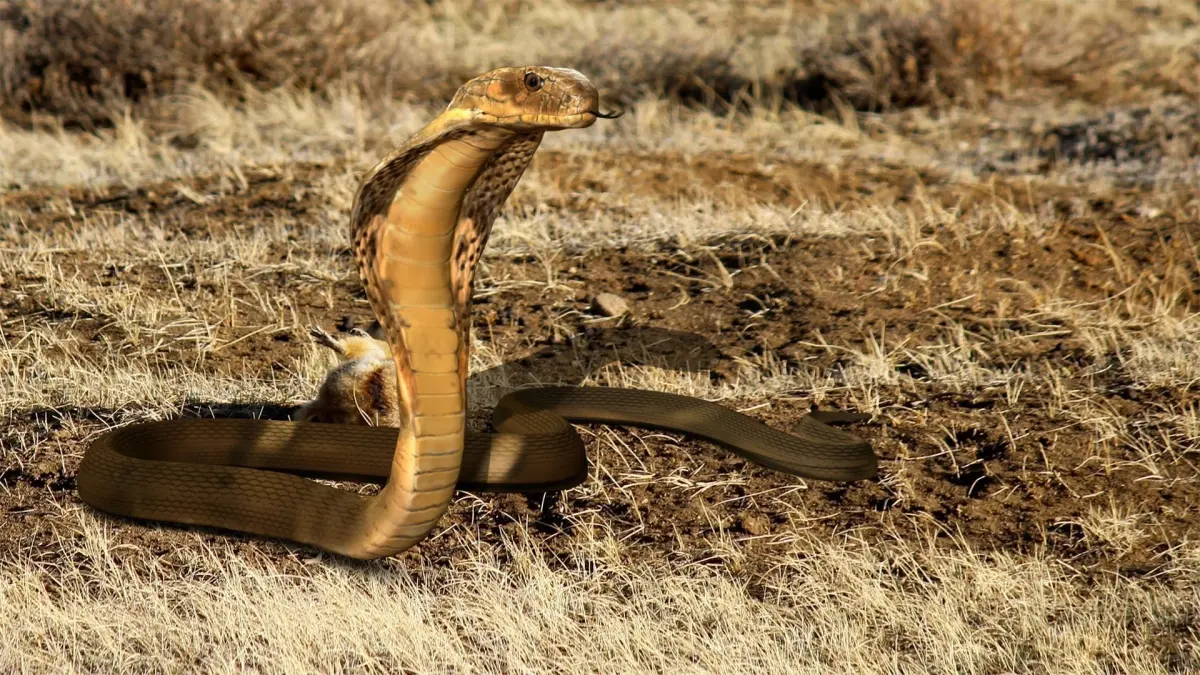
Buy King Cobra Snake - Rigged Low-poly 3D model
$120
License: Royalty Free
Rigged
PBR
Realtime
Animated
Free

author:
jackfurneri1984
Renders and source materials belong to the author jackfurneri1984.
Specifications
- Platform
- cgtrader
- Animated
- Rigged
- 3D Print ready
- VR / AR / Low-poly
- PBR
- Textures
- Materials
- UV Mapping
- Polygons
- 12802
- Vertices
- 12934
- Geometry
- Unknown
Usage recommendations
Realtime rendering
✓
PC Game development
✓
Mobile Game Development
✓
VR/AR applications
✓
Visualisation
✕
Cinema
✕
Advertising
✕
3D Printing
✕
CAD Engineering
✕
E-Commerce & Interactive 3D Web
✓
FAQ
Is this a free 3D model?
No, this model costs $120.
How do I download this 3D model?
This model is available through the "Go to purchase" button on this page.
What license applies to this model?
This model comes with a Royalty Free license. See the seller's page (via "Go to purchase") for the full terms.
Does it include rigging and animation?
No animation, rig only. Complete specs can be found in the Specifications block.
Does this model have UV mapping?
Yes, this model has UV mapping. Complete specs can be found in the Specifications block.
What textures and materials does this 3D model include?
This model has textures and materials. Complete specs can be found in the Specifications block.
Can I use it for 3D printing?
No, this model is not intended for 3D printing.
Additional information
Highly realistic King Cobra snake model - Rigged, textured and animation ready!!
WINNER - THIRD PLACE FOR THE VR ANIMAL CHALLANGE
https://www.cgtrader.com/blog/vr-animals-challenge-has-ended-hail-the-kings-of-the-digital-jungle-2016-08
Realistic and film quality King Cobra
King Cobra snake model - Rigged, textured and animation ready!!
Along with the following material I produced a Vimeo video (that you can find on Vimeo putting /175941841 after the web domain) which explains a bit of my model. In particular I suggest that you watch it before starting to animate it.
The model has been created inside of Zbrush and then moved to maya for the rigging process. Details:
12802 faces
* 12934 vertices
High Quality textures (4096 X 4096)
Unwrapped UVs with NO overlapping.
Diffuse Map
Normal Map
* Specular Map
Model centered in (0,0,0)
Real size model
Fully rigged
Enriched by Blendshape expressions
Detailed mouth and tongue movements with Blendshapes
* Animation Ready PRODUCT CONTENT
2 rig versions - Base one (Cobra.mb) and advanced one (CobraFKTail) - Maya version 2016
4K Textures
Obj files with just the simple geometry
Detailed PDF Guide to get started with the maya rigs
PS - The 2 versions of the snake in .obj format are just a way to give you a clean mesh of my snake for you (eventually for a custom setup)
In the video you will find the following arguments:
Fast overview of the snake in the viewport
Main Controllers to move the neck
Important tip to smoothly move the neck up
Mouth, head and tongue controllers
Slither functionality
Explanation of the slither functionality
Example of the slither functionality
Explanation of some deformers and blendshapes to roll and move the body
PDF GUIDE
I strongly suggest to read the PDF Guide to get familiar with the rig. The guide explains every single aspect of the Snake rig.In particular these are the explained arguments:
Head/Tongue Controllers
Neck Controllers
Main Actions Controller
Tail Controllers
Global Controller
Example to setup a proper animation
Further reading: snake setup to follow a motion path
SMALL TIPS TO ANIMATE THE RIG WITH PROFESSIONAL QUALITY
I studied and produced my rig so that you guys can learn the best and easiest way to move and animate the snake in your personal projects. My concern is to give you the best in terms of productivity and efficiency.
There are 3 important ways you can follow:
You can use a motion path where the snake follows your desired trajectory. All the details about how to setup this method, are explained in the PDF Guide
Another way is to set up a path (as it is explained in the video) and animate the offset with the Slither functionality
You can animate using the body and tail controllers as explained in the PDF Guide
WINNER - THIRD PLACE FOR THE VR ANIMAL CHALLANGE
https://www.cgtrader.com/blog/vr-animals-challenge-has-ended-hail-the-kings-of-the-digital-jungle-2016-08
Realistic and film quality King Cobra
King Cobra snake model - Rigged, textured and animation ready!!
Along with the following material I produced a Vimeo video (that you can find on Vimeo putting /175941841 after the web domain) which explains a bit of my model. In particular I suggest that you watch it before starting to animate it.
The model has been created inside of Zbrush and then moved to maya for the rigging process. Details:
12802 faces
* 12934 vertices
High Quality textures (4096 X 4096)
Unwrapped UVs with NO overlapping.
Diffuse Map
Normal Map
* Specular Map
Model centered in (0,0,0)
Real size model
Fully rigged
Enriched by Blendshape expressions
Detailed mouth and tongue movements with Blendshapes
* Animation Ready PRODUCT CONTENT
2 rig versions - Base one (Cobra.mb) and advanced one (CobraFKTail) - Maya version 2016
4K Textures
Obj files with just the simple geometry
Detailed PDF Guide to get started with the maya rigs
PS - The 2 versions of the snake in .obj format are just a way to give you a clean mesh of my snake for you (eventually for a custom setup)
In the video you will find the following arguments:
Fast overview of the snake in the viewport
Main Controllers to move the neck
Important tip to smoothly move the neck up
Mouth, head and tongue controllers
Slither functionality
Explanation of the slither functionality
Example of the slither functionality
Explanation of some deformers and blendshapes to roll and move the body
PDF GUIDE
I strongly suggest to read the PDF Guide to get familiar with the rig. The guide explains every single aspect of the Snake rig.In particular these are the explained arguments:
Head/Tongue Controllers
Neck Controllers
Main Actions Controller
Tail Controllers
Global Controller
Example to setup a proper animation
Further reading: snake setup to follow a motion path
SMALL TIPS TO ANIMATE THE RIG WITH PROFESSIONAL QUALITY
I studied and produced my rig so that you guys can learn the best and easiest way to move and animate the snake in your personal projects. My concern is to give you the best in terms of productivity and efficiency.
There are 3 important ways you can follow:
You can use a motion path where the snake follows your desired trajectory. All the details about how to setup this method, are explained in the PDF Guide
Another way is to set up a path (as it is explained in the video) and animate the offset with the Slither functionality
You can animate using the body and tail controllers as explained in the PDF Guide
Similar models
Find the models you need