
Publication date: 2025-09-17
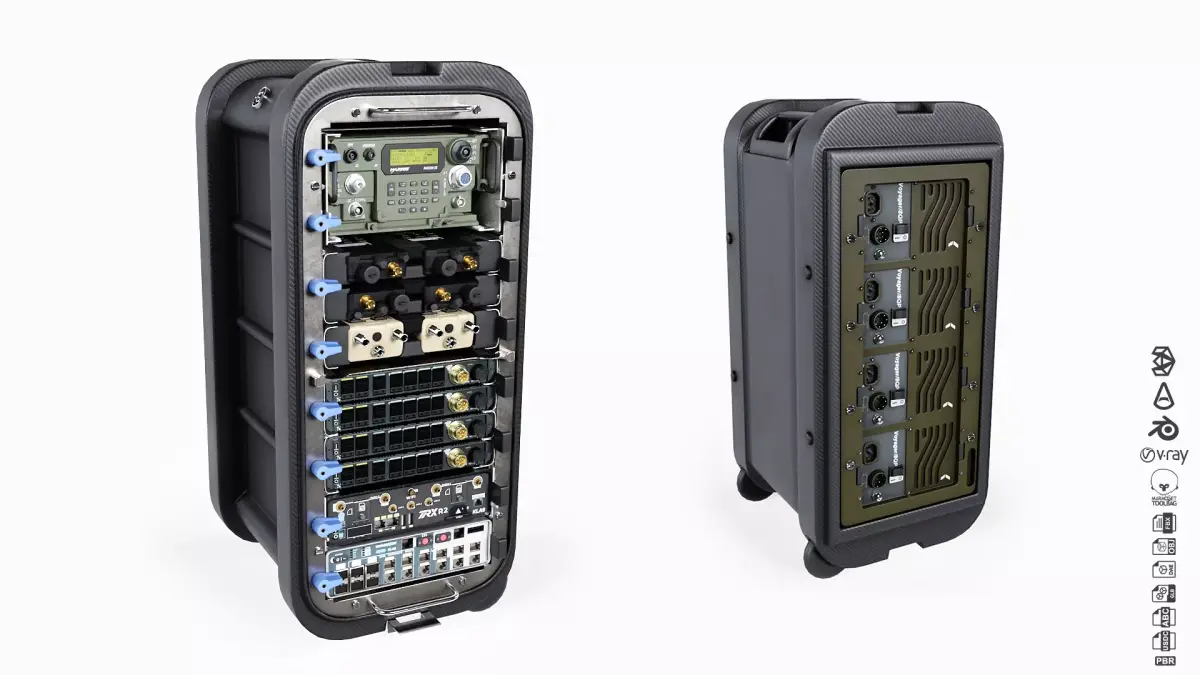
Buy Klas - Voyager TMES Tactical Multi Enclave System Low-poly 3D model
$125
License: Royalty Free No Ai
Rigged
PBR
Realtime
Animated
Free

author:
Durchacht
Renders and source materials belong to the author Durchacht.
Specifications
- Platform
- cgtrader
- Animated
- Rigged
- 3D Print ready
- VR / AR / Low-poly
- PBR
- Textures
- Materials
- UV Mapping
- Polygons
- 106646
- Vertices
- 100646
- Geometry
- No N-gons | No faceted geometry | Manifold geometry |
Usage recommendations
Realtime rendering
✓
PC Game development
✓
Mobile Game Development
✕
VR/AR applications
✕
Visualisation
✕
Cinema
✕
Advertising
✕
3D Printing
✕
CAD Engineering
✕
E-Commerce & Interactive 3D Web
✕
FAQ
Is this a free 3D model?
No, this model costs $125.
How do I download this 3D model?
Click the "Go to purchase" button to buy and download this model.
What license applies to this model?
This model comes with a Royalty Free No Ai license. See the seller's page (via "Go to purchase") for the full terms.
Does it include rigging and animation?
No animation, rig only. Complete specs can be found in the Specifications block.
Does this model have UV mapping?
Yes, this model has UV mapping. Complete specs can be found in the Specifications block.
What textures and materials does this 3D model include?
This model has textures and materials, including PBR. Complete specs can be found in the Specifications block.
Can I use it for 3D printing?
No, this model is not intended for 3D printing.
Additional information
Klas - Voyager TMES | Tactical Multi Enclave System
This model is built to real world scale (cm) and is based on several photographs and close-ups of the real product to give you the best quality in terms of texture references and proportions.
Low-poly model for VR, AR, gaming or simulation projects and other real-time applications.
Well-organised, easy to use 3D scenes with scene layers, assigned materials and technical checks.
Including:
Klas Voyager 8 Transit Case; Racks; Harris AN/PRC-117; Thales AN/PRC-148C IMBITR; Harris L3 Tactical Rover; Klas Voyager EMm; Klas TRX R2; Klas Voyager ESR 2.0
4k PBR Textures [4096px*4096px]: Albedo - Ambient Occlusion - Normal [openGL Y+] - Metalness - Roughness
3ds Max 2022 or above: Scanline [Legacy Material] - Arnold [Physical Material] - Arnold [Standard Surface Material] - Arnold [PBR Material] - ART [Physical Material] - VRay [VRay Material]
Blender 4.3
Marmoset Toolbag 5.02
Alembic
Collada
FBX
GLB
OBJ
USDC
Technical check:
UV's : No Overlapped UV's - No Flipped Faces
Textures : Texture aspect Ratio - Full edge padding coverage
Meshes : No N-gons - No Isolated Vertices - Set pivot point - Reset X-Form
Scene : Naming System - Layer System - Assigned Textures - Model at scene origin
In case of missing textures:
3ds Max: Open the 3dsMax file and press Shift+T to open the Asset Tracking dialogue box. Select all missing textures > Go to File > Set Path > Select the texture folder.
Blender: Open the Blend file and go to File > External Data > Find Missing Files > Select the texture folder.
Enjoy!
This model is built to real world scale (cm) and is based on several photographs and close-ups of the real product to give you the best quality in terms of texture references and proportions.
Low-poly model for VR, AR, gaming or simulation projects and other real-time applications.
Well-organised, easy to use 3D scenes with scene layers, assigned materials and technical checks.
Including:
Klas Voyager 8 Transit Case; Racks; Harris AN/PRC-117; Thales AN/PRC-148C IMBITR; Harris L3 Tactical Rover; Klas Voyager EMm; Klas TRX R2; Klas Voyager ESR 2.0
4k PBR Textures [4096px*4096px]: Albedo - Ambient Occlusion - Normal [openGL Y+] - Metalness - Roughness
3ds Max 2022 or above: Scanline [Legacy Material] - Arnold [Physical Material] - Arnold [Standard Surface Material] - Arnold [PBR Material] - ART [Physical Material] - VRay [VRay Material]
Blender 4.3
Marmoset Toolbag 5.02
Alembic
Collada
FBX
GLB
OBJ
USDC
Technical check:
UV's : No Overlapped UV's - No Flipped Faces
Textures : Texture aspect Ratio - Full edge padding coverage
Meshes : No N-gons - No Isolated Vertices - Set pivot point - Reset X-Form
Scene : Naming System - Layer System - Assigned Textures - Model at scene origin
In case of missing textures:
3ds Max: Open the 3dsMax file and press Shift+T to open the Asset Tracking dialogue box. Select all missing textures > Go to File > Set Path > Select the texture folder.
Blender: Open the Blend file and go to File > External Data > Find Missing Files > Select the texture folder.
Enjoy!
Similar models
Find the models you need