
Publication date: 2022-06-25
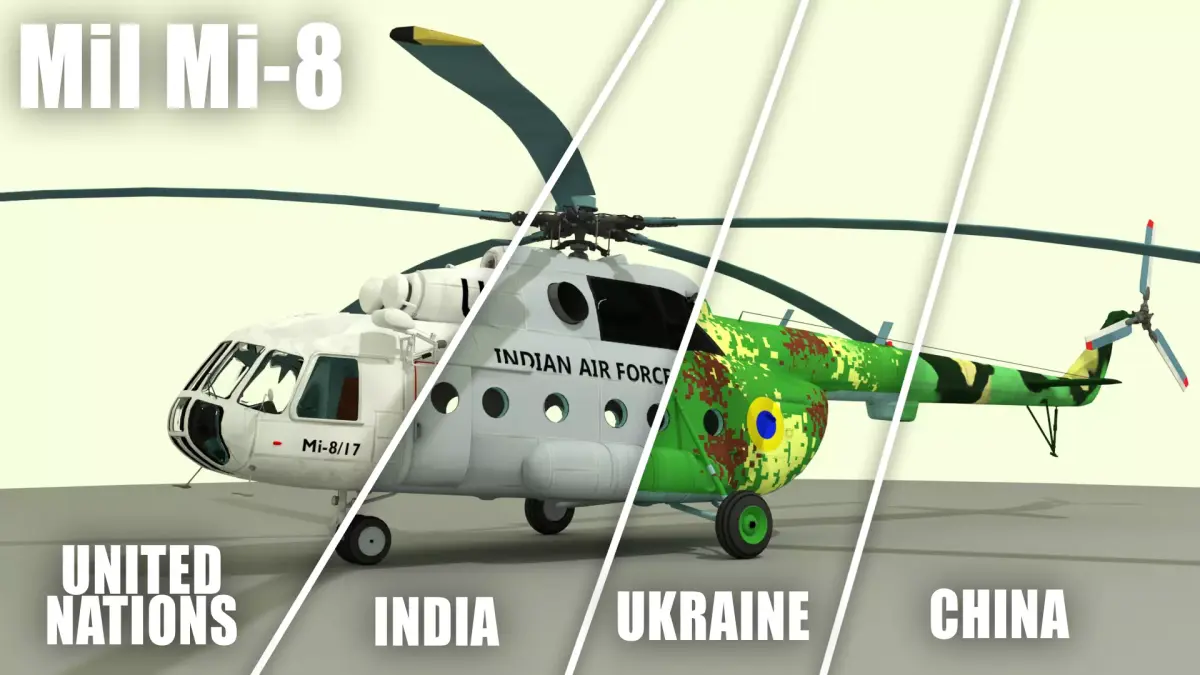
Buy Mil Mi-8 Helicopter 3D model
$38
License: Royalty Free
Rigged
PBR
Realtime
Animated
Free
Renders and source materials belong to the author andrewwms.
Specifications
- Platform
- cgtrader
- Animated
- Rigged
- 3D Print ready
- VR / AR / Low-poly
- PBR
- Textures
- Materials
- UV Mapping
- Polygons
- 120850
- Vertices
- 138124
- Geometry
- No N-gons | No faceted geometry | Manifold geometry |
Usage recommendations
Realtime rendering
✕
PC Game development
✕
Mobile Game Development
✕
VR/AR applications
✕
Visualisation
✓
Cinema
✓
Advertising
✓
3D Printing
✕
CAD Engineering
✕
E-Commerce & Interactive 3D Web
✕
FAQ
Is this a free 3D model?
No, this model costs $38.
How do I download this 3D model?
Click the "Go to purchase" button to buy and download this model.
What license applies to this model?
This model comes with a Royalty Free license. See the seller's page (via "Go to purchase") for the full terms.
Does it include rigging and animation?
This model has no rig or animation. It is a static 3D object.
Does this model have UV mapping?
Yes, this model has UV mapping. Full specs are in the Specifications block, with more background in Additional information.
What textures and materials does this 3D model include?
This model has textures and materials. Full specs are in the Specifications block, with more background in Additional information.
Can I use it for 3D printing?
No, this model is not intended for 3D printing.
Additional information
This model has been inspired by the famous Soviet Mil Mi-8.
Because of a long list of operators, a decision has been made to include not one but four different textures for this model.These textures resemble the following operators:
United Nations
Ukrainian Air Force
Indian Air Force
PLAAF
The model itself was done in such a way to be suitable for easy rigging and animating. This means that the parts that are usually animated are separate objects (main rotor, rear rotor, wheels, door...).
To change the texture (in Blender) all you have to do is select a different texture under the Skin material.
Although realistically-looking, the cockpit has been modeled as a low-priority object. This means that it's not entirely identical to its real life counterpart.
NOTE: If you have any additional questions, feel free to contact me at: hunteryt568@gmail.com
Because of a long list of operators, a decision has been made to include not one but four different textures for this model.These textures resemble the following operators:
United Nations
Ukrainian Air Force
Indian Air Force
PLAAF
The model itself was done in such a way to be suitable for easy rigging and animating. This means that the parts that are usually animated are separate objects (main rotor, rear rotor, wheels, door...).
To change the texture (in Blender) all you have to do is select a different texture under the Skin material.
Although realistically-looking, the cockpit has been modeled as a low-priority object. This means that it's not entirely identical to its real life counterpart.
NOTE: If you have any additional questions, feel free to contact me at: hunteryt568@gmail.com
Similar models
Find the models you need