
Publication date: April 17, 2013
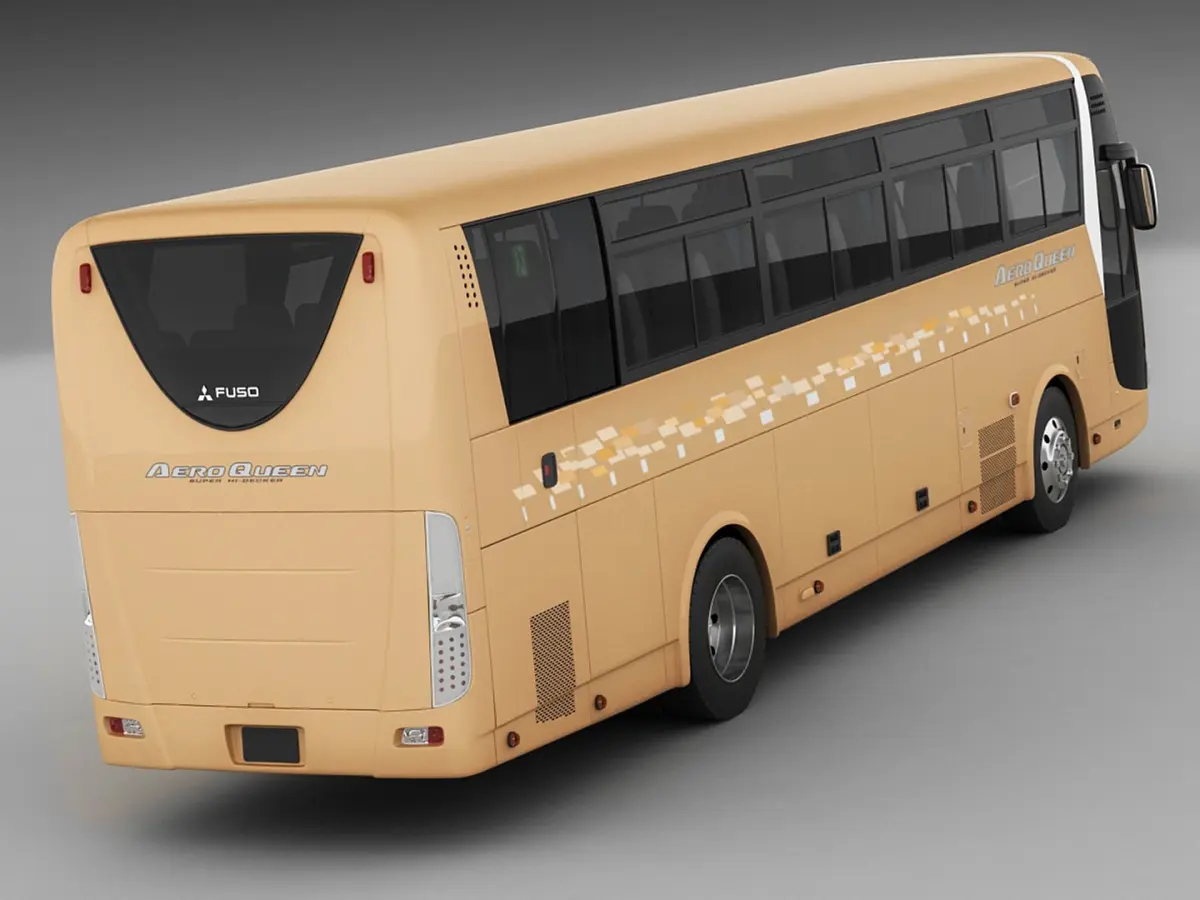
Buy Mitsubishi Aero Queen 3D model
$149
License: Editorial Uses Only
Rigged
PBR
Realtime
Animated
Free
Renders and source materials belong to the author fisherman3d.
Specifications
- Platform
- turbosquid
- Animated
- Rigged
- 3D Print ready
- VR / AR / Low-poly
- PBR
- Textures
- Materials
- UV Mapping
- Polygons
- 350000
- Vertices
- 350000
- Geometry
- Unknown
Usage recommendations
Realtime rendering
✕
PC Game development
✕
Mobile Game Development
✕
VR/AR applications
✕
Visualisation
✓
Cinema
✓
Advertising
✓
3D Printing
✕
CAD Engineering
✕
E-Commerce & Interactive 3D Web
✕
FAQ
Is this a free 3D model?
No, this model costs $149.
How do I download this 3D model?
This model is available through the "Go to purchase" button on this page.
What license applies to this model?
This model comes with a Editorial Uses Only license. See the seller's page (via "Go to purchase") for the full terms.
Does it include rigging and animation?
This model has no rig or animation. It is a static 3D object.
Does this model have UV mapping?
Yes, this model has UV mapping. Complete specs can be found in the Specifications block.
What textures and materials does this 3D model include?
This model has textures and materials. Complete specs can be found in the Specifications block.
Can I use it for 3D printing?
No, this model is not intended for 3D printing.
Additional information
- detailed exterior, simple interior
- every object has material name, you can easily change or apply materials
- bus body is uvw unwrapped so you can easily place your text or picture
.
.
.max format:
Rar archive contains three scenes
1. 3ds max 2010 with vray materials, which you can see in preview images studio renders. Carpaint colour can be different.
2. 3ds max 2010 with mental ray materials, which you can see in preview images outdoor renders. Carpaint colour can be different.
3. 3ds max 2010 with simple standard materials scanline
Just put into your scene and render!
In each scene model is provided with mesh smooth modifier on stack on objects that need it. Mesh smooth is set 1 or 2 for renders. Exterior, interior and wheels are in different layers.
.
.obj format:
Rar archive contains two versions of model with simple materials:
1. Exported without collapsing after mesh smooth. Low or med poly mesh which you can see in preview images, good if you need to edit model.
2. Exported after appllying mesh smooth. Just import, apply materials and render
.
.lwo, .xsi, .c4d format:
Rar archive contains model exported without collapsing after mesh smooth. Low or med poly mesh which you can see in preview images, good if you need to edit model.
Simple materials.
.
.fbx and .3ds format:
Rar archive contains model exported after appllying mesh smooth. Just import, apply materials and render.
.
.
Polycount:
without meshsmooth max,obj,lwo,xsi,c4d: 350 000 polygons
collapsed fbx,3ds,obj: 1 200 000 faces/650 000 polygons
- every object has material name, you can easily change or apply materials
- bus body is uvw unwrapped so you can easily place your text or picture
.
.
.max format:
Rar archive contains three scenes
1. 3ds max 2010 with vray materials, which you can see in preview images studio renders. Carpaint colour can be different.
2. 3ds max 2010 with mental ray materials, which you can see in preview images outdoor renders. Carpaint colour can be different.
3. 3ds max 2010 with simple standard materials scanline
Just put into your scene and render!
In each scene model is provided with mesh smooth modifier on stack on objects that need it. Mesh smooth is set 1 or 2 for renders. Exterior, interior and wheels are in different layers.
.
.obj format:
Rar archive contains two versions of model with simple materials:
1. Exported without collapsing after mesh smooth. Low or med poly mesh which you can see in preview images, good if you need to edit model.
2. Exported after appllying mesh smooth. Just import, apply materials and render
.
.lwo, .xsi, .c4d format:
Rar archive contains model exported without collapsing after mesh smooth. Low or med poly mesh which you can see in preview images, good if you need to edit model.
Simple materials.
.
.fbx and .3ds format:
Rar archive contains model exported after appllying mesh smooth. Just import, apply materials and render.
.
.
Polycount:
without meshsmooth max,obj,lwo,xsi,c4d: 350 000 polygons
collapsed fbx,3ds,obj: 1 200 000 faces/650 000 polygons
Similar models
Find the models you need