
Publication date: 2023-09-30
Buy Picking rack system 3D model
$8.2
License: Royalty Free
Rigged
PBR
Realtime
Animated
Free

author:
WareDream
Renders and source materials belong to the author WareDream.
Specifications
- Platform
- cgtrader
- Animated
- Rigged
- 3D Print ready
- VR / AR / Low-poly
- PBR
- Textures
- Materials
- UV Mapping
- Polygons
- 3429
- Vertices
- 3826
- Geometry
- Polygon mesh
- Plugins used
Usage recommendations
Realtime rendering
✕
PC Game development
✕
Mobile Game Development
✕
VR/AR applications
✕
Visualisation
✓
Cinema
✓
Advertising
✓
3D Printing
✕
CAD Engineering
✕
E-Commerce & Interactive 3D Web
✕
FAQ
Is this a free 3D model?
No, this model costs $8.2.
How do I download this 3D model?
To purchase this model, click the "Go to purchase" button.
What license applies to this model?
This model is distributed under the Royalty Free license. Click "Go to purchase" for full license details.
Does it include rigging and animation?
This model has no rig or animation. It is a static 3D object.
Does this model have UV mapping?
No, this model does not have UV mapping.
What textures and materials does this 3D model include?
This model has textures and materials, including PBR. Check the Specifications block for technical details and Additional information for the full picture.
Can I use it for 3D printing?
No, this model is not intended for 3D printing.
Additional information
Dimensions:
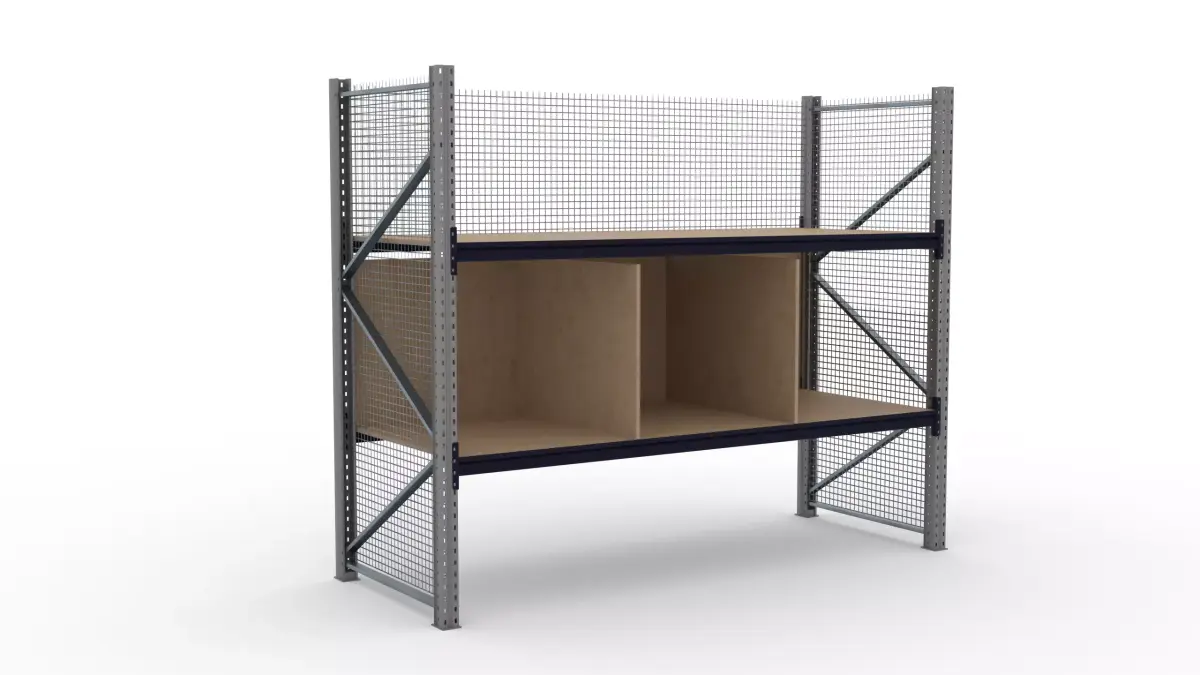
General dimensions are 2900x1100x2355mm
Picking shelves dimensions: 2730x1090mm
Chipboard thickness: 20mm
About:
On ground level there's space for 3 EUR-size pallets.
First level - 3 picking sockets
Second level - one big socket
Statistics (polygons/verts):
Single pole: 192/190
Single traverse belt: 440/408
Support: 56/54
Stiffener belt: 12/5 (+4 screw heads 72/56)
Pole foot: 36/34
Mesh fence - plane with transparency texture
Two .blend native files:
picking_rack _system.blend - like in pictures and youtube preview. Textures are packed into file. You don't have to do anything else.
not_applied.blend - file easier to edit. Most objects has mirror and array modifier. You can edit it according to your preferences. I have one tutorial to edits file like this, might be useful:
https://www.youtube.com/watch?v=BE27cIyEQzM&ab_channel=WareDream (one important difference - alpha channel divided by 5, not 4)
This file is much lighter, because textures aren't packed in. Defalt path to textures is /textures, so after unpacking to the same folder the textures should be attached
Textures are in 2K PNG, except Fence texture (4K PNG) and Alpha (JPG)
If you want to modify object, but you don't know how to do it - contact me before buying and I'll try to visualize the object for you according to your preferences.
Also, If you have any issues or need any specific logistics object for visualization, fell free to contact me.
General dimensions are 2900x1100x2355mm
Picking shelves dimensions: 2730x1090mm
Chipboard thickness: 20mm
About:
On ground level there's space for 3 EUR-size pallets.
First level - 3 picking sockets
Second level - one big socket
Statistics (polygons/verts):
Single pole: 192/190
Single traverse belt: 440/408
Support: 56/54
Stiffener belt: 12/5 (+4 screw heads 72/56)
Pole foot: 36/34
Mesh fence - plane with transparency texture
Two .blend native files:
picking_rack _system.blend - like in pictures and youtube preview. Textures are packed into file. You don't have to do anything else.
not_applied.blend - file easier to edit. Most objects has mirror and array modifier. You can edit it according to your preferences. I have one tutorial to edits file like this, might be useful:
https://www.youtube.com/watch?v=BE27cIyEQzM&ab_channel=WareDream (one important difference - alpha channel divided by 5, not 4)
This file is much lighter, because textures aren't packed in. Defalt path to textures is /textures, so after unpacking to the same folder the textures should be attached
Textures are in 2K PNG, except Fence texture (4K PNG) and Alpha (JPG)
If you want to modify object, but you don't know how to do it - contact me before buying and I'll try to visualize the object for you according to your preferences.
Also, If you have any issues or need any specific logistics object for visualization, fell free to contact me.
Similar models
Find the models you need