
Publication date: 2020-01-08
Buy PolySlicer for 3dsMax 3D model
$39
License: Royalty Free
Rigged
PBR
Realtime
Animated
Free

author:
batuhanozer52
Renders and source materials belong to the author batuhanozer52.
Specifications
- Platform
- cgtrader
- Animated
- Rigged
- 3D Print ready
- VR / AR / Low-poly
- PBR
- Textures
- Materials
- UV Mapping
- Polygons
- 0
- Vertices
- 0
- Geometry
- Polygon mesh
- Plugins used
Usage recommendations
Realtime rendering
✕
PC Game development
✕
Mobile Game Development
✕
VR/AR applications
✕
Visualisation
✓
Cinema
✓
Advertising
✓
3D Printing
✕
CAD Engineering
✕
E-Commerce & Interactive 3D Web
✕
FAQ
Is this a free 3D model?
No, this model costs $39.
How do I download this 3D model?
To purchase this model, click the "Go to purchase" button.
What license applies to this model?
This model is distributed under the Royalty Free license. Click "Go to purchase" for full license details.
Does it include rigging and animation?
This model has no rig or animation. It is a static 3D object.
Does this model have UV mapping?
No, this model does not have UV mapping.
What textures and materials does this 3D model include?
This model has no textures or materials.
Can I use it for 3D printing?
No, this model is not intended for 3D printing.
Additional information
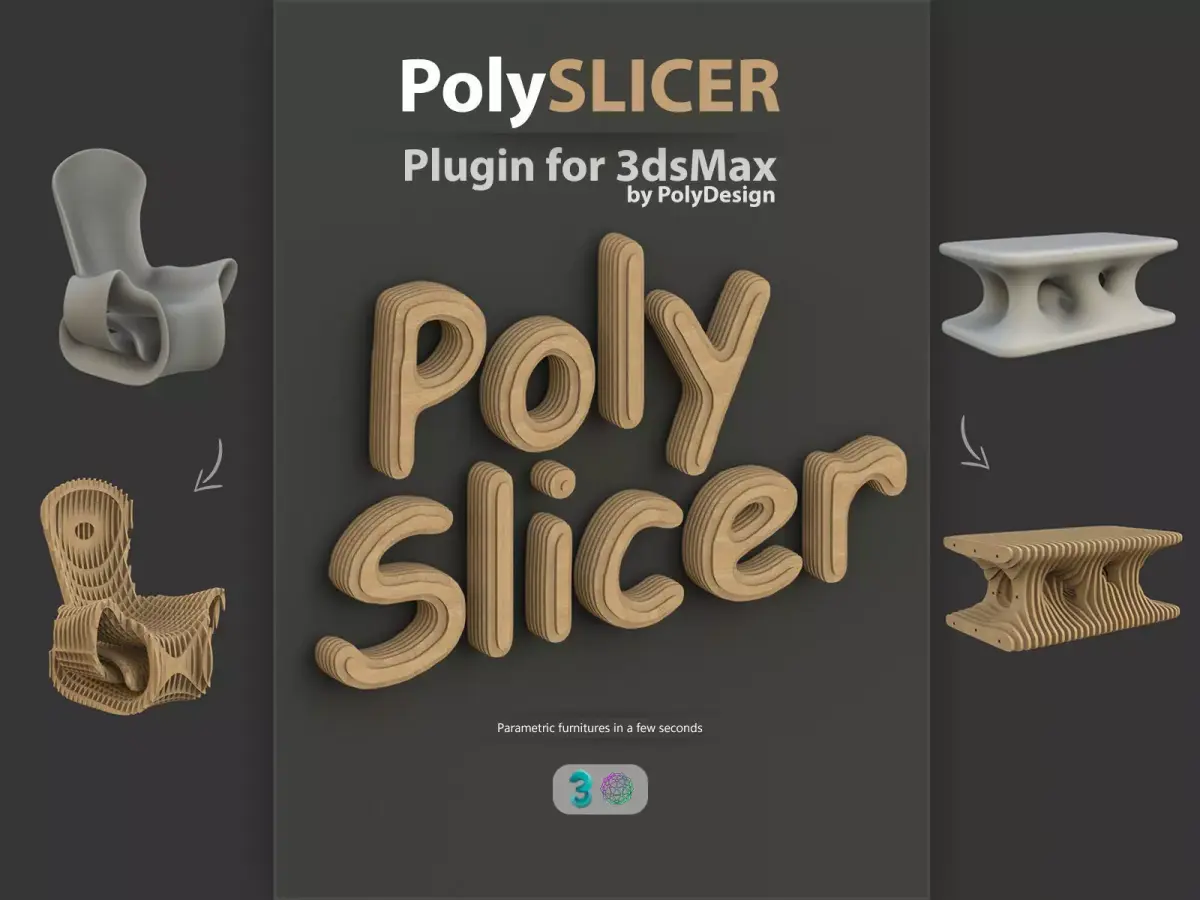
PolySlicer is a 3dsMax plugin for creating parametric furnitures in a few seconds.
PolySlicer provides all the workflow from creating slices to unwrapping for creating a complete cg model.
PolySlicer works tested and works with 3dsMax 2012 and all upper 3dsmax versions.
But it is always better to use this plugin in the newest 3dsmax version you have access.
PolySlicer doesn't create any data for a cnc machine. It only generates a model for cgi.
Features:
Slicer features:
PolySlicer slices the selected object in a few seconds.
PolySlicer produces clean and even edge topology, and a flat ngons for the large wood areas which is easier to edit.
You can specify the slicing direction.
You can specify the parameters like wood thickness, gap thickness, edge resolution.
You can add a chamfer for smooth edges.
There is a checkbox for showing detailed info after the slicing process completes.
Rods and Washers tool:
You can add metal rods with a single click.
PolySlicer calculates rod's length and washers positions automatically.
You can specify the parameters such as washer thickness and radius and rod thickness.
Rod stops at the last slice it can reach.
For more details, watch the video.
Unwrap uvs tool:
Unwrap tool unwraps the uvs of the slices with a one click.
You can adjust the tiling and rotation of the uvs seperately for edges and sides.
PolySlicer generates different material ID's for edges and flat surfaces. So you can easily add different wood materials to edges.
What's new in v1.01
Added 3dsMax 2022 support
Bug fixes
PolySlicer provides all the workflow from creating slices to unwrapping for creating a complete cg model.
PolySlicer works tested and works with 3dsMax 2012 and all upper 3dsmax versions.
But it is always better to use this plugin in the newest 3dsmax version you have access.
PolySlicer doesn't create any data for a cnc machine. It only generates a model for cgi.
Features:
Slicer features:
PolySlicer slices the selected object in a few seconds.
PolySlicer produces clean and even edge topology, and a flat ngons for the large wood areas which is easier to edit.
You can specify the slicing direction.
You can specify the parameters like wood thickness, gap thickness, edge resolution.
You can add a chamfer for smooth edges.
There is a checkbox for showing detailed info after the slicing process completes.
Rods and Washers tool:
You can add metal rods with a single click.
PolySlicer calculates rod's length and washers positions automatically.
You can specify the parameters such as washer thickness and radius and rod thickness.
Rod stops at the last slice it can reach.
For more details, watch the video.
Unwrap uvs tool:
Unwrap tool unwraps the uvs of the slices with a one click.
You can adjust the tiling and rotation of the uvs seperately for edges and sides.
PolySlicer generates different material ID's for edges and flat surfaces. So you can easily add different wood materials to edges.
What's new in v1.01
Added 3dsMax 2022 support
Bug fixes
Similar models

Find the models you need