
Publication date: May 08, 2024
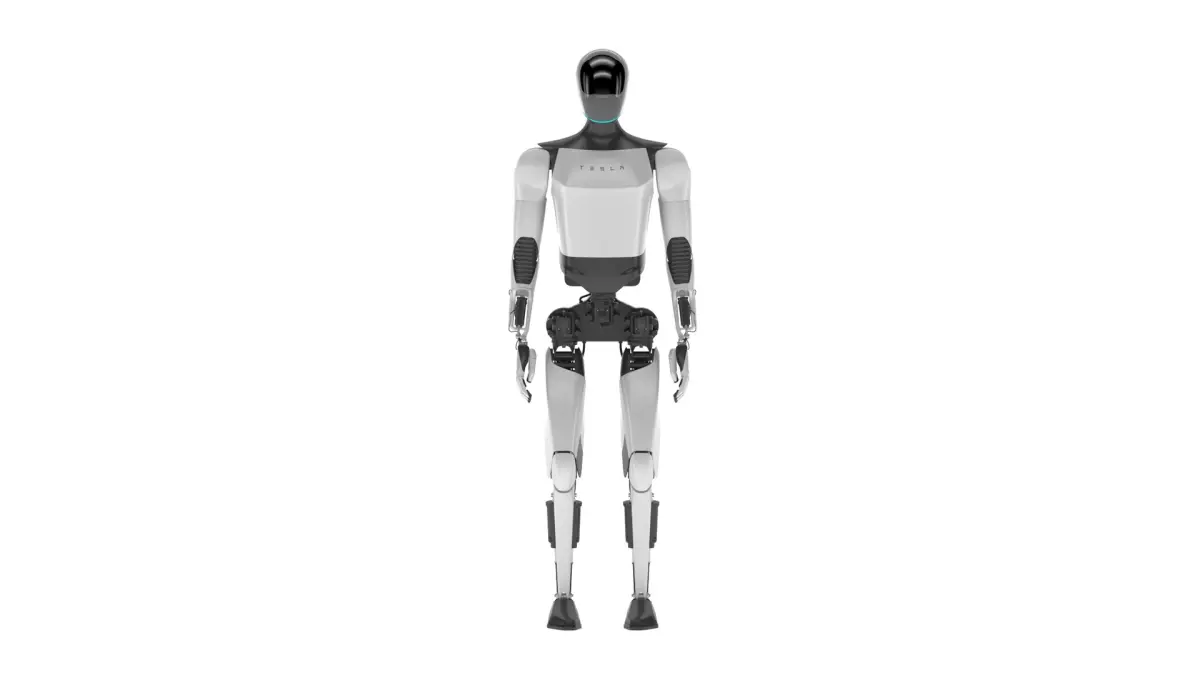
Buy Tesla Optimus V2 3D model
$99
License: Editorial Uses Only
Rigged
PBR
Realtime
Animated
Free
Renders and source materials belong to the author I am Frezzy.
Specifications
- Platform
- turbosquid
- Animated
- Rigged
- 3D Print ready
- VR / AR / Low-poly
- PBR
- Textures
- Materials
- UV Mapping
- Polygons
- 185946
- Vertices
- 190273
- Geometry
- Unknown
Usage recommendations
Realtime rendering
✕
PC Game development
✕
Mobile Game Development
✕
VR/AR applications
✕
Visualisation
✓
Cinema
✓
Advertising
✓
3D Printing
✕
CAD Engineering
✕
E-Commerce & Interactive 3D Web
✕
FAQ
Is this a free 3D model?
No, this model costs $99.
How do I download this 3D model?
Use the "Go to purchase" button below to get this model.
What license applies to this model?
This model is distributed under the Editorial Uses Only license. Click "Go to purchase" for full license details.
Does it include rigging and animation?
This model has no rig or animation. It is a static 3D object.
Does this model have UV mapping?
No, this model does not have UV mapping.
What textures and materials does this 3D model include?
This model has materials, including PBR, but no textures. See the Specifications block for more information.
Can I use it for 3D printing?
No, this model is not intended for 3D printing.
Additional information
This 3D model was built to the strict quality standards of the team founded by Frezzy.
Since 2013, we have provided thousands of 3D models for professional projects for our clients around the world.
We create 3D models so that our customers save the most money and time.
******
FEATURE HIGHLIGHTS:
+ High quality polygonal model. Mesh and details are built by our professional artists.
+ Models resolutions are optimized for polygon efficiency.
+ Model has fully applied materials.
+ All materials are included.
+ Objects are logically named for ease of scene management.
+ No part-name confusion when importing several models into a scene
+ No cleaning up is necessary. Just drop your models into the scene and start rendering.
+ No special plugin is needed to open the scene.
+ Model does not include any backgrounds or scenes used in the preview images.
******
FILE FORMATS:
+ 3ds Max 2018 and Vray 3.6 (native format)
+ 3ds Max 2018 Standard Materials
+ Maya 2018 Hardware Materials
+ Cinema 4D R20 Standard Materials
+ Blender 2.91 Eevee materials
+ FBX and OBJ (You can use this format to import them into a lot of different 3D software.)
******
HELP AND TIPS:
Problems when unzipping files: If you have problems with extracting files, please use the latest version of WinRAR (WinRAR is free).
+ Smoother faces and edges: You'll need to add the subdivision command to get a smoother curved version. (For example, Turbosmooth in 3ds Max.)
+ OBJ and FBX are not smooth. Contact me to get the smoother version for free. Or you can import them into 3D software, add a subdivision command, and re-export them as high-poly.
+ Lower-version 3D software: Don't worry about lower-version 3D software. Use FBX or OBJ to import them.
+ For Cinema 4D users: Add HyperNURBS for each object to get subdivision (smooth). And make sure the setting of HyperNURBS is Catmull-Clark and Subdivide UVs is Edge to correct textures and UVs.
+ Don't forget to contact me if you encounter any other issues that aren't listed above.
Since 2013, we have provided thousands of 3D models for professional projects for our clients around the world.
We create 3D models so that our customers save the most money and time.
******
FEATURE HIGHLIGHTS:
+ High quality polygonal model. Mesh and details are built by our professional artists.
+ Models resolutions are optimized for polygon efficiency.
+ Model has fully applied materials.
+ All materials are included.
+ Objects are logically named for ease of scene management.
+ No part-name confusion when importing several models into a scene
+ No cleaning up is necessary. Just drop your models into the scene and start rendering.
+ No special plugin is needed to open the scene.
+ Model does not include any backgrounds or scenes used in the preview images.
******
FILE FORMATS:
+ 3ds Max 2018 and Vray 3.6 (native format)
+ 3ds Max 2018 Standard Materials
+ Maya 2018 Hardware Materials
+ Cinema 4D R20 Standard Materials
+ Blender 2.91 Eevee materials
+ FBX and OBJ (You can use this format to import them into a lot of different 3D software.)
******
HELP AND TIPS:
Problems when unzipping files: If you have problems with extracting files, please use the latest version of WinRAR (WinRAR is free).
+ Smoother faces and edges: You'll need to add the subdivision command to get a smoother curved version. (For example, Turbosmooth in 3ds Max.)
+ OBJ and FBX are not smooth. Contact me to get the smoother version for free. Or you can import them into 3D software, add a subdivision command, and re-export them as high-poly.
+ Lower-version 3D software: Don't worry about lower-version 3D software. Use FBX or OBJ to import them.
+ For Cinema 4D users: Add HyperNURBS for each object to get subdivision (smooth). And make sure the setting of HyperNURBS is Catmull-Clark and Subdivide UVs is Edge to correct textures and UVs.
+ Don't forget to contact me if you encounter any other issues that aren't listed above.
Similar models
Find the models you need