
Publication date: 2023-12-15
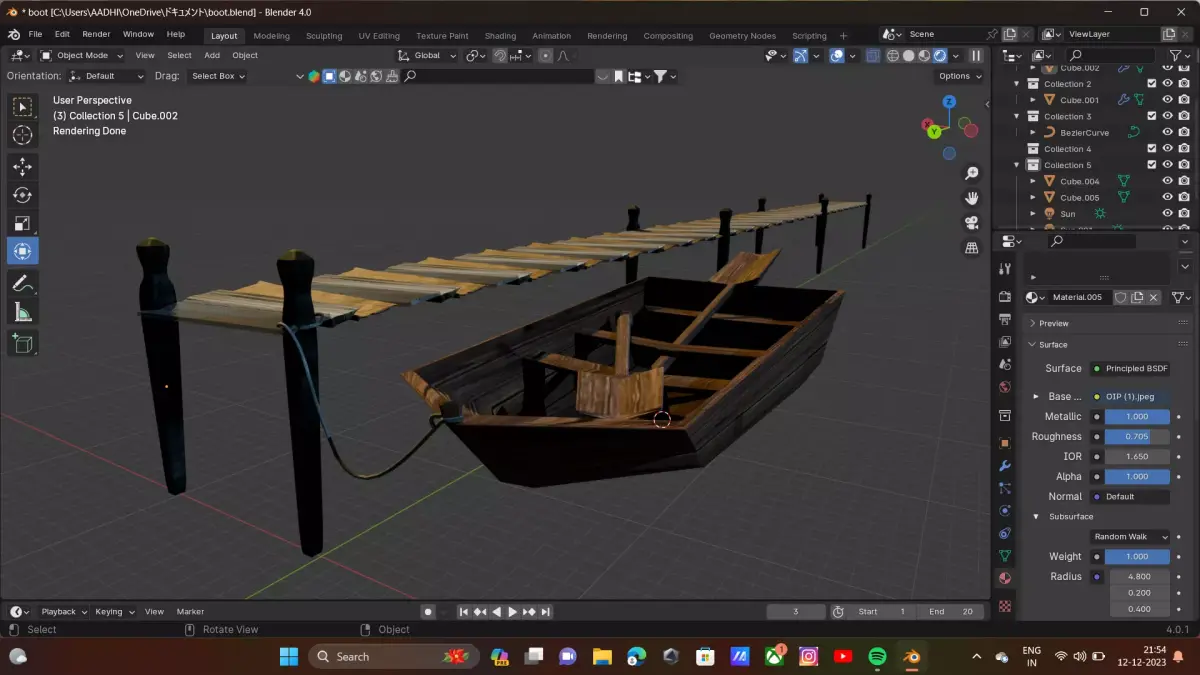
Buy Sumal bridge and old bost Low-poly 3D model
$2
License: Royalty Free
Rigged
PBR
Realtime
Animated
Free
Renders and source materials belong to the author aadhiaadhigggv.
Specifications
- Platform
- cgtrader
- Animated
- Rigged
- 3D Print ready
- VR / AR / Low-poly
- PBR
- Textures
- Materials
- UV Mapping
- Polygons
- 600
- Vertices
- 269
- Geometry
- Polygon mesh
- Plugins used
Usage recommendations
Realtime rendering
✓
PC Game development
✓
Mobile Game Development
✓
VR/AR applications
✓
Visualisation
✕
Cinema
✕
Advertising
✕
3D Printing
✕
CAD Engineering
✕
E-Commerce & Interactive 3D Web
✓
FAQ
Is this a free 3D model?
No, this model costs $2.
How do I download this 3D model?
Click the "Go to purchase" button to buy and download this model.
What license applies to this model?
This model is distributed under the Royalty Free license. Click "Go to purchase" for full license details.
Does it include rigging and animation?
This model has no rig or animation. It is a static 3D object.
Does this model have UV mapping?
Yes, this model has UV mapping. Full specs are available in the Specifications block.
What textures and materials does this 3D model include?
This model has textures and materials, including PBR. Full specs are available in the Specifications block.
Can I use it for 3D printing?
No, this model is not intended for 3D printing.
Additional information
Sumal Bridge:Reference Images:
Collect reference images of Sumal Bridge from different angles. This will help you capture the details accurately.Modeling:
Start with a basic shape and gradually add details.Use the array modifier for repetitive elements like pillars or railings.Pay attention to proportions and scale to make it realistic.Textures:
UV unwrap your model to apply textures accurately.Use high-resolution textures for close-up shots.Weathering and aging effects can add realism.Lighting:
Experiment with different lighting setups to highlight the bridge's features.Consider using HDRIs for realistic lighting and reflections.Environment:
Create a suitable environment for your bridge, like a river or landscape.Add appropriate background elements to enhance the scene.Old Boat:Reference Images:
Gather reference images of old boats, paying attention to details like rust, wear, and tear.Modeling:
Begin with the boat's basic shape and then add details like planks, rust, and damaged areas.Consider using the sculpting tools for organic details.Materials:
Use a combination of materials to simulate rust, wood, and metal.Experiment with procedural textures to add variation.Weathering:
Introduce wear and tear by adding scratches, dents, and faded paint.Consider using a displacement map to simulate deformation.Scene Composition:
Place the boat in a realistic setting, considering its age and condition.Experiment with different camera angles for interesting compositions.General Tips:Save Versions:
Save different versions of your project as you progress, allowing you to go back if needed.Rendering:
Experiment with different render settings to find the best balance between quality and performance.Consider using Cycles for high-quality renders.Community Support:
Blender has a vibrant community. If you encounter challenges, forums like Blender Artists or Reddit (r/blender) can be great resources for help and feedback.Tutorials:
If you're new to Blender or specific techniques, don't hesitate to follow tutorials. There are many excellent resources online.Have Fun:
Enjoy the creative process! Experiment with different ideas and techniques to make your Sumal bridge and old boat unique.
Collect reference images of Sumal Bridge from different angles. This will help you capture the details accurately.Modeling:
Start with a basic shape and gradually add details.Use the array modifier for repetitive elements like pillars or railings.Pay attention to proportions and scale to make it realistic.Textures:
UV unwrap your model to apply textures accurately.Use high-resolution textures for close-up shots.Weathering and aging effects can add realism.Lighting:
Experiment with different lighting setups to highlight the bridge's features.Consider using HDRIs for realistic lighting and reflections.Environment:
Create a suitable environment for your bridge, like a river or landscape.Add appropriate background elements to enhance the scene.Old Boat:Reference Images:
Gather reference images of old boats, paying attention to details like rust, wear, and tear.Modeling:
Begin with the boat's basic shape and then add details like planks, rust, and damaged areas.Consider using the sculpting tools for organic details.Materials:
Use a combination of materials to simulate rust, wood, and metal.Experiment with procedural textures to add variation.Weathering:
Introduce wear and tear by adding scratches, dents, and faded paint.Consider using a displacement map to simulate deformation.Scene Composition:
Place the boat in a realistic setting, considering its age and condition.Experiment with different camera angles for interesting compositions.General Tips:Save Versions:
Save different versions of your project as you progress, allowing you to go back if needed.Rendering:
Experiment with different render settings to find the best balance between quality and performance.Consider using Cycles for high-quality renders.Community Support:
Blender has a vibrant community. If you encounter challenges, forums like Blender Artists or Reddit (r/blender) can be great resources for help and feedback.Tutorials:
If you're new to Blender or specific techniques, don't hesitate to follow tutorials. There are many excellent resources online.Have Fun:
Enjoy the creative process! Experiment with different ideas and techniques to make your Sumal bridge and old boat unique.
Similar models
Find the models you need